

Quick Breakdown
- Most small service businesses dispatch the same way they always have — phone calls, a whiteboard, and a group text chain. It works until it doesn't.
- Dispatching software replaces the chaos with a system: one place to assign jobs, see where your trucks are, and keep customers in the loop without burning extra time.
- GPS fleet monitoring and dispatching often come in the same tool. If you're already paying for one, you might already have the other.
If you run a small service business, there's a good chance "dispatching" looks something like this: you call your guy, he doesn't answer, you text him, he responds 20 minutes later, you figure out who's closest to the job, and you call the customer to let them know someone's on the way.
It works — most of the time. But when you've got four jobs happening at once, a truck that broke down in the middle of a route, and a customer calling to ask where their technician is, the phone-and-whiteboard system starts showing its cracks.
Dispatching software exists to fix that. Here's what it actually does, what to look for, and whether it's worth it for a fleet your size.
What is dispatching software?
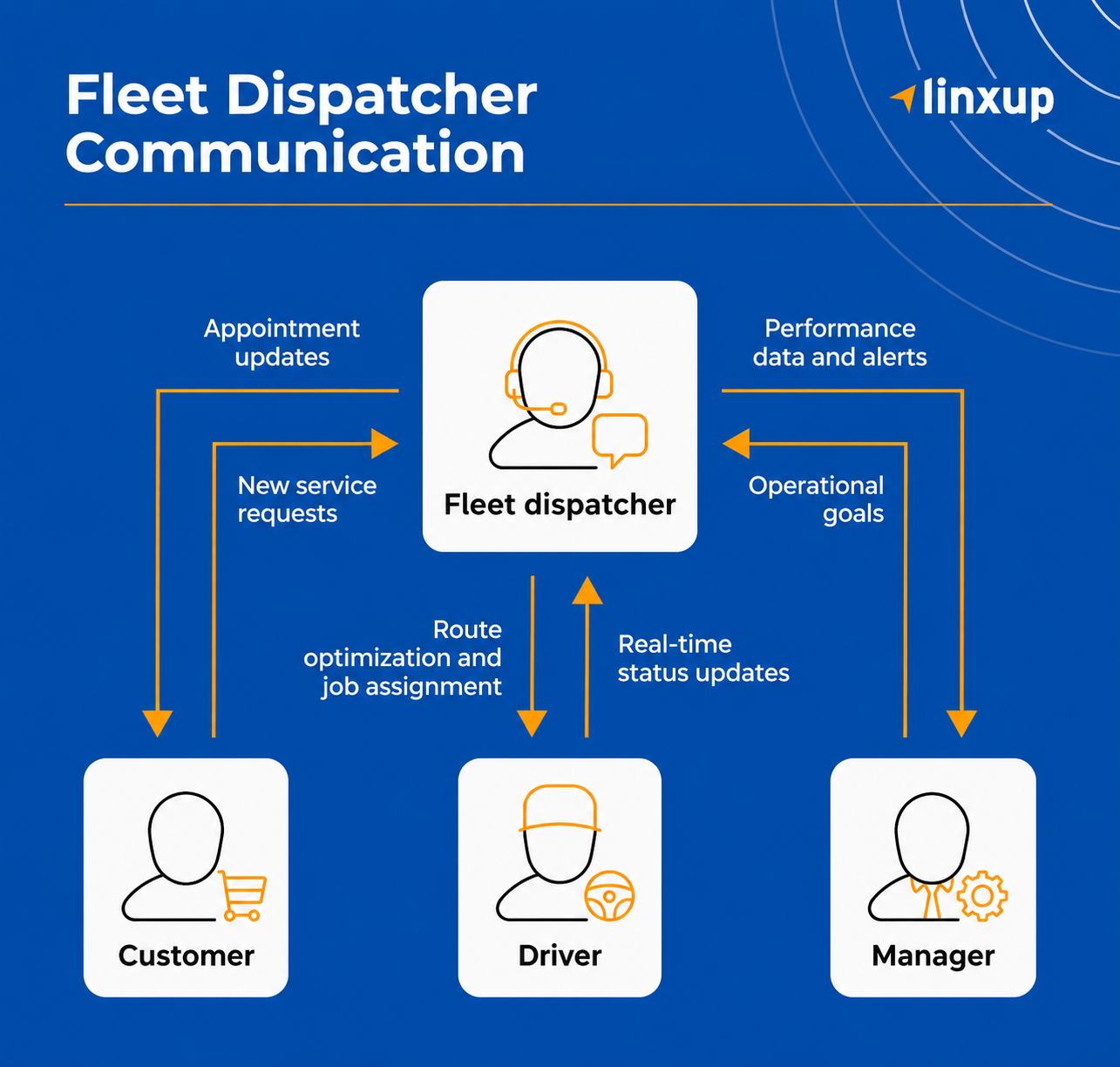
Dispatching software is a tool that helps you assign jobs, schedule routes, and communicate with drivers — all from one place. Instead of coordinating everything manually across calls and texts, you get a central dashboard that shows who's working, where they are, and what's on their schedule.
For small service businesses — HVAC, plumbing, electrical, pest control, landscaping — it typically handles:
- Scheduling jobs and assigning them to specific drivers or technicians
- Real-time location monitoring so you know where your team is without calling to ask
- Route optimization to cut down on drive time and fuel waste
- Customer notifications for arrival windows and updates
- Reporting on job completion times, mileage, and driver behavior
The goal is simple: less time coordinating, more time running jobs.
Signs that your current dispatch process is costing you
Most business owners switch dispatching software because something finally broke.
Here are the signs it's time:
You're spending too much time on the phone: If a big chunk of your morning is spent calling drivers to figure out who's going where, that's time you're not spending on anything else.
Jobs are falling through the cracks: Double-booked appointments, missed service calls, customers who weren't notified — these aren't just operational problems; they're customer trust problems.
You don't actually know where your trucks are: "I think he's finishing up in [city]" is not the same as knowing. If you can't answer a customer's "When will someone be there?" with confidence, that's a gap.
Fuel costs keep climbing, and you're not sure why: Inefficient routing and excessive idle time add up fast across even a small fleet. Without visibility, you're just guessing.
You're the bottleneck: If nothing moves without you making a call or sending a text, your operation has a single point of failure — and it's you.
What dispatching software does for a small service business
For small teams, the biggest wins aren't flashy features; they're tools that help you run your business without added complexity.
Job assignment without the back-and-forth.
You can see who's available, where they are, and what their schedule looks like, then assign a job in a few clicks. No calls, no texts, no waiting for a reply.
Real-time location monitoring.
Know where every vehicle is at any given moment. When a customer calls asking for an ETA, you have an actual answer.
Automated customer communication.
Many tools will send customers an update when a technician is on the way or running behind — without you having to make the call yourself.
Route optimization.
Instead of your drivers figuring out their own routes, the software maps the most efficient order for the day's jobs. Fewer miles driven, less fuel burned.
A record of everything.
Job history, drive times, completed routes — all logged automatically. When something goes wrong or a customer disputes a service call, you have the data.
Dispatching software and GPS monitoring: Do you really need both?
A lot of small business owners don't realize these two things often come in the same tool.
Dispatching software handles scheduling, job assignment, and communication. Fleet monitoring handles vehicle location, driver behavior, maintenance alerts, and compliance. They're different functions — but they use the same underlying technology: GPS.
If you're already using a GPS monitoring tool, check whether it includes dispatching features. If you're shopping for dispatching software, look for one that also gives you vehicle location and driver behavior data. For most small fleets, one well-chosen platform covers both.
What to look for before you commit
Not every dispatching tool is built for a small service fleet. Before you sign up, run through this checklist:
Does it fit how your business actually works?
Some platforms are built for large logistics operations. If you're the owner and the dispatcher, look for something you can learn quickly and run from your phone.
Does it include real-time GPS monitoring?
Job scheduling tells you where your job trucks are supposed to be. Knowing where your trucks are at all times — and getting alerts when something's off — is what helps you manage a fleet, not just a calendar.
Is the mobile app usable in the field?
Your drivers and technicians need something they can actually use from a truck. If it's clunky on a phone, it won't get used.
What does the reporting look like?
Basic job completion data is fine. But if you want to understand where your fuel is going, which routes are inefficient, or which drivers are costing you money, you need more than a job log.
What does it cost to scale?
Per-user pricing can get expensive fast. Understand what you're paying per vehicle or per user as your team grows.
Is there a contract?
Some fleet software locks you into annual contracts. Others are month-to-month. Know what you're getting into.
Ready to move past the whiteboard?
If your current dispatch process is costing you time, the right software can make a real difference. Compare a few options, request demos, and find the tool that fits how your team actually works.
Dispatching software FAQ
What is dispatching software?
Dispatching software is a tool that helps businesses schedule jobs, assign drivers or technicians, monitor vehicle locations in real time, and communicate with both drivers and customers — all from a single platform. For small service businesses, it replaces manual coordination across calls and texts with one system that keeps everyone aligned.
What's the difference between dispatching software and fleet management software?
Dispatching software focuses on scheduling, job assignment, and communication. Fleet management software focuses on vehicle location, driver behavior, maintenance monitoring, and compliance.
How much does dispatching software cost for a small business?
Most paid options for small businesses run between $25–$99 per user per month, depending on the feature set. Some platforms charge per vehicle instead of per user, which can be more cost-effective for fleets. A few offer free tiers with limited functionality.
Do I need dispatching software if I only have a few trucks?
Even with two or three vehicles, a dispatching tool can save you time and help you respond faster to customers. The return on investment tends to show up in shorter drive time, fewer missed jobs, and less time spent on mapping out jobs. Getting the right system in place early makes adding more trucks easier.
Can dispatching software help with customer communication?
Yes. Most platforms can send automated updates to customers when a technician is on the way or running behind, and some include two-way messaging. Customers won’t need to call and ask "where is my technician?" because they’ll already know.