Shipping Container GPS Tracking for Job Sites and Storage Yards
Track location, prevent theft, and manage storage
from one dashboard
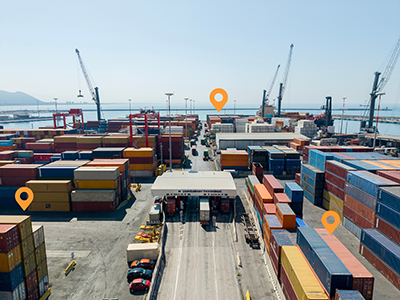
A container full of materials or goods is a lot of money sitting on a site with nobody watching. When you can’t find the one you need because you don’t know if it’s sitting at a port terminal, parked on a remote job site, or being moved off-hours without authorization, you risk expense delays and potential loss.
A reliable shipping container GPS tracking system makes total visibility simple. By mounting industrial-grade, long-life asset trackers directly onto your shipping containers and storage pods, you can pinpoint where everything is right from your phone or computer.
Get straightforward updates on live location, transit milestones, and security status without relying on manual check-ins or endless phone calls to dispatchers.

Why Put GPS Trackers on Shipping Containers?
Adding a long-life GPS asset tracker to your shipping containers gives you total operational control across every leg of transit and on-site storage:
-
Stop wondering where your containers are: Find out instantly which staging yard, customer site, or freight terminal holds the specific container you need, eliminating hours of phone calls and lost inventory search time.
-
Protect against cargo theft: Shipping containers packed with inventory or expensive tools are high-value targets in unmonitored yards. Get an alert if a unit moves outside approved hours so you can take action.
-
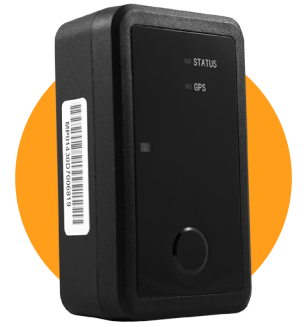
No wiring on most containers: Screw or magnet mount the tracker to the outside of the container. No electrician, no mechanic.
-
Monitor long-term remote storage: Keep eyes on containers parked on remote jobsites or extended customer drop-offs for months or years at a time with extended multi-year battery power.
Fits on every container
Our tracking hardware and software work seamlessly across all types of intermodal freight, portable storage, and specialized job site containers:
| Container Catagory | Suported Assets |
| Intermodel and Freight Containers | Dry Van Containers, High Cube Containers, Flat Rack Containers, Open Top Units |
| On-Site & Job Site Storage | Portable Tool Vaults, Construction Office Containers, Hazardous Material Storage Units |
| Commercial & Portable Storage | Customer Storage Pods, On-Demand Mobile Storage Units, Rental Inventory Containers |
| Specialized Logistics Equipment | Reefers (Refrigerated Containers), Chassis Trailers, Intermodal ISO Tank Containers |
How shipping cointainer tracking works
Getting real-time visibility into your cointainer inventory is fast and straightfoward:
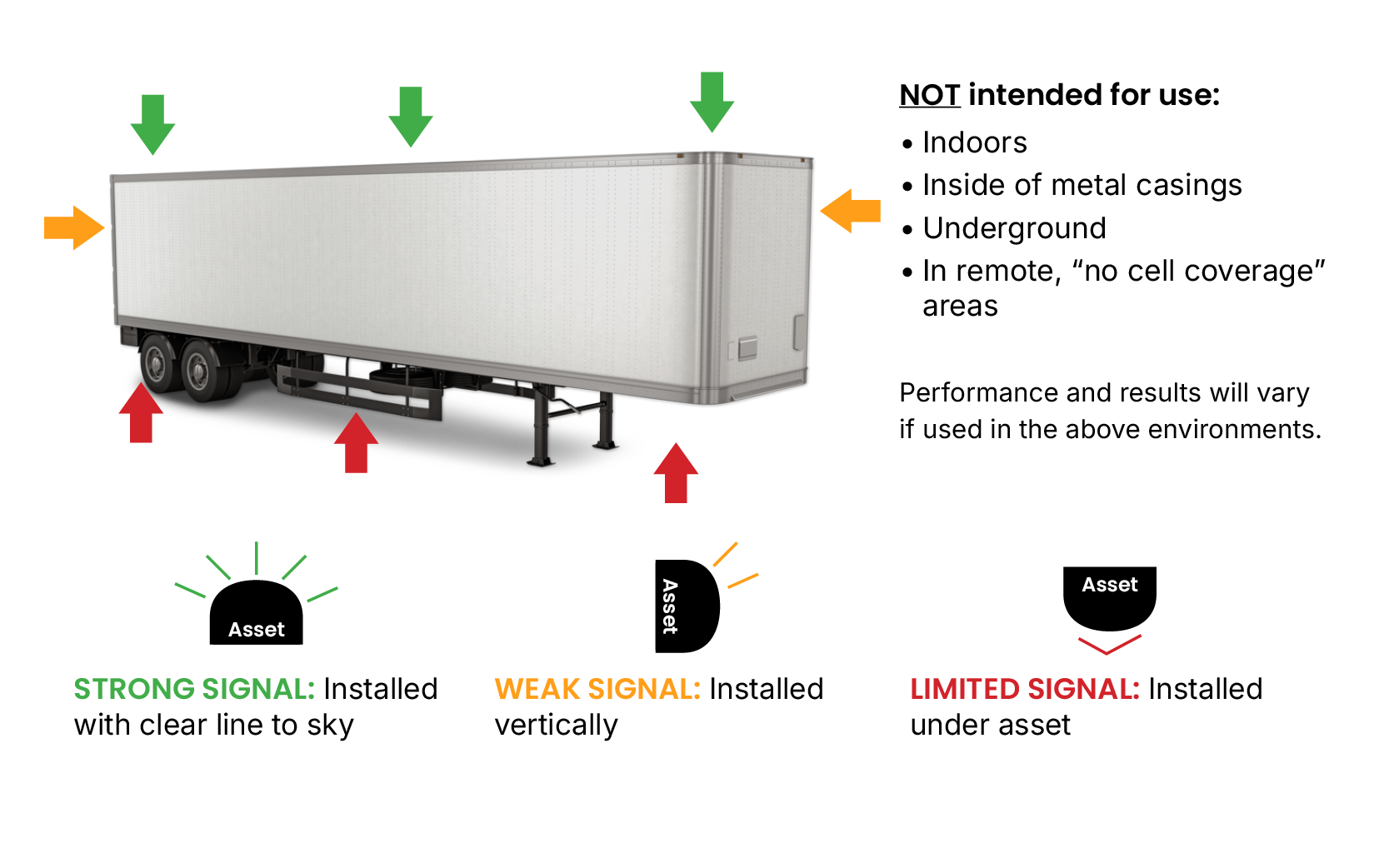
- Mount the tracker: Attach it to the outside of the container with the included screw mount or an optional magnet mount. Pick a spot where the top of the device has a clear view of the sky and won’t get too hot.
- Wake it up: Activate the device in your Linxup account, then press and hold the button on the front for 5 seconds. The first location can take up to 24 hours to show up.
- Check your containers from anywhere: The tracker checks in once a day. Open the app to see where every container is, review location history, and set up geofences.
What to look for in container tracking hardware
Shipping containers face punishing environmental conditions during sea, rail, highway, and job site deployments. A standard plug-in vehicle tracker won't work on non-powered units. A proper container GPS tracking device requires specific features built for tough industrial use:
-
Power options that fit the container: Most containers have no power source, so a battery-powered tracker is the usual pick. It mounts with screws or a magnet and needs no wiring. If a container has its own power supply, a wired tracker can connect to it instead.
-
Daily location check-ins: Battery trackers report once a day, which keeps the battery going for the long haul. You’ll know which site each container is on and whether it moved since yesterday.
-
Simple mounting: A screw mount or magnet mount gets the tracker on in minutes.
-
Rugged, weatherproof build: Hardware engineered to withstand marine salt spray, driving rain, road dust, high vibration, and extreme heat or freezing cold.
-
Long battery life: Years of daily check-ins before the battery needs to be replaced.
Custom geofences customized
to your business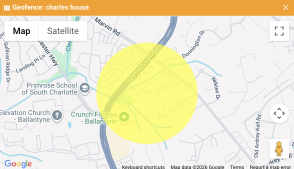
A geofence creates a virtual perimeter around your distribution center, customer job site, port facility, or storage yard. Each time a tracker checks in, Linxup checks whether the container is inside or outside the boundaries you’ve set.
How to set up a geofence for your containers
Setting up perimeters takes just a few clicks inside the Linxup app. Search for your target facility or job site address on the map, draw a custom shape around the footprint of the property, and save. From there, select your alert preferences and specify which managers receive immediate notifications.
"I've have used other tracking devices previously, and this one is by far the best... Very well-made product. The device's location is extremely accurate and works even in areas where my phone has crappy service. The app for my iPhone is very user-friendly as well."
Shawn M.
Verified Customer
What geofences can tell you about your containers
-
After-hours theft alerts: Set up security geofences around drop yards and job sites overnight or over the weekend. If a shipping container checks in outside that boundary, the system sends a push notification or text so you can alert law enforcement.
-
Proof of delivery & placement: Verify the day a container reaches a customer site or job site. Keep time-stamped digital records that back up delivery timelines, storage billing, and contract fulfillment.
-
Fewer interruptions: Instead of calling drivers or yard managers to ask “Has container #4021 arrived yet?”, simply check your dashboard or rely on automated arrival notifications. Your team stays focused on the job.
-
Accurate site dwell time tracking: Monitor how long a container remains parked inside a customer site perimeter. Simplify rental billing, identify overdue rental units, and keep your inventory moving.
Best practices for container geofences
-
Trace the facility boundary: Use custom polygon drawing tools to trace the physical footprint of your yard or client site. This prevents vehicles traveling on neighboring roads from triggering false arrival alerts.
-
Add a small buffer: Avoid placing boundaries directly along outer fences. Adding a 50- to 100-foot buffer accounts for GPS margin-of-error when containers are stacked near property lines.
-
Tailor notification rules: Set high-priority SMS alerts for high-risk storage zones after hours, and route routine yard arrivals into daily summary reports to prevent alert fatigue.
Turn asset data into smarter workflows
Knowing container locations does more than just stop cargo theft — it brings operational clarity, accountability, and efficiency to complex supply chains:
-
Spot idle containers: See if containers are sitting unused in staging yards for weeks or if rental units are underused across client locations.
-
Find available containers fast: Skip the search through crowded storage lots. Quickly locate available containers, assign them to upcoming jobs, and keep more of them earning.
-
Verify drop-offs: When your own drivers or outside haulers move your containers, location history confirms each drop-off happened where it was supposed to.
Frequently asked questions about container GPS tracking
Linxup container trackers are $15 per tracker per month. Hardware costs depend on the plan you choose:
-
No contract: $79 per tracker
-
2-year contract: $29 per tracker
-
3-year contract: $0, hardware included
For example, tracking 5 containers with no contract costs $395 up front, then $75 a month. On a 3-year contract, you pay nothing up front, just $75 a month.
Once every 24 hours. After you wake the tracker up, the first check-in can take up to 24 hours.
The tracker checks in once a day to save battery. On that schedule, the battery lasts 3 years.
A container number lets you follow a shipment while an ocean carrier or railroad is handling it. Once the container is on your job site, in your yard, or at a customer’s property, nobody is tracking it but you. A GPS tracker shows where it is no matter who moved it.
Use the included screw mount or the optional magnet mount (sold separately). Mount it on the outside of the container where the top of the device has a clear view of the sky, and avoid spots that get very hot.
It needs cell coverage to report, so check coverage where your containers sit. Trackers don’t work well indoors, underground, or inside metal boxes.
Yes. Linxup shows your service trucks, pickups, trailers, equipment, and containers on one map.
You draw a boundary around your yard, job site, or customer’s property on a map. If a container checks in outside that boundary, you get a text or email alert.
Still have questions?
We're here to help you!