Rate and Monitor Drivers
Improve Driver Safety & Reduce Your Liability
Operate with intelligence.
Protect with confidence.
Target high-risk or top-performing drivers and achieve results. Using Linxup to monitor and rate driver performance makes it easy to improve your fleet’s performance. Linxup streamlines your safety program with
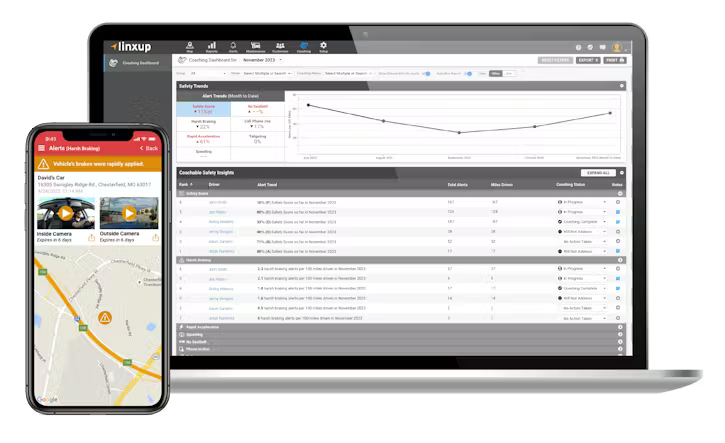
Daily rankings of each driver or vehicle and performance from best to worst.
A configurable driver safety score and ranking for each driver or vehicle.
Simple and transparent scoring with clear, research-backed metrics.
Driver Coaching Dashboard makes it easy to access driving trends and insights.
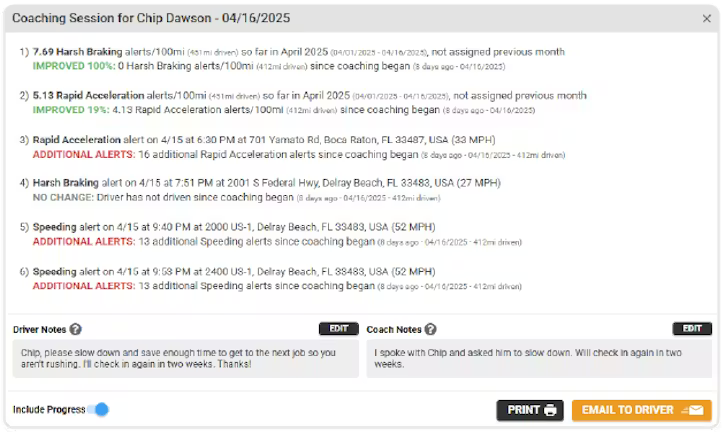
Driver Coaching Sessions, which allow you to create custom performance reviews and enhance transparency with your team.
Driver Coaching notes make it easy to document conversations with drivers and track progress over time.
With LinxCam, drivers receive verbal, in-cab prompts when unsafe behaviors occur.
Reports identifying speeding activity, stops, idling, and more.
Driver Coaching Dashboard
It’s not always easy to spot risky drivers or remember who’s been coached and when. Linxup helps you track it all and keep your team driving safely. The Driver Coaching Dashboard surfaces the most actionable insights and provides a tool to help manage a coaching workflow.
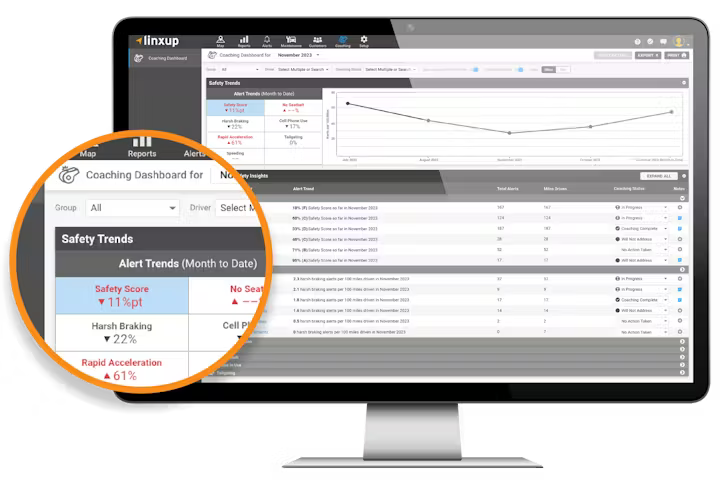
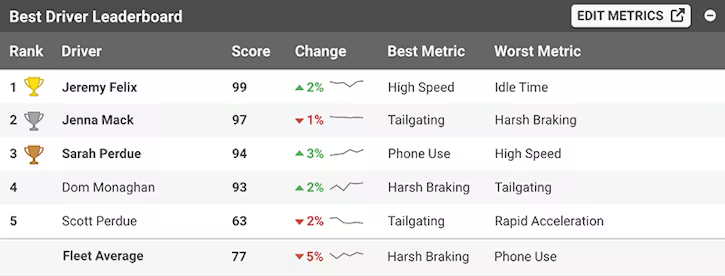
Instantly gauge fleet performance with Driver Leaderboard rankings.
Spot at-risk drivers early and take action before accidents happen.
Review video footage of the most egregious events.
Create custom coaching sessions and track progress over time.
Document driver coaching sessions to stay organized and consistent.
Reduce fuel consumption and wear and tear on your vehicles.
Improve employee/driver retention.
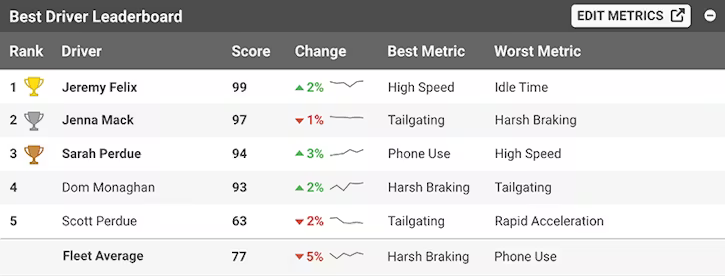
Driver Leaderboard
The leaderboard showcases your top drivers, where they’re doing well, and where they need improvement. Month-over-month percentage changes make it easy to see who’s getting better and who may need a little coaching— so you can step in fast.
Driver Coaching Sessions
Target Risk. Coach with Purpose. Drive Results. Driver Coaching Sessions help you:
- Address high-risk or top-performing drivers.
- Schedule personalized sessions based on driving trends and alerts.
- Track progress with performance updates.
- Share “Driver Notes” via email to keep drivers informed and engaged.
Driver Coaching Alerts
With Linxup’s AI-powered LinxCam, drivers receive automated, in-cab alerts in real-time, intervening exactly when high-risk driving behaviors occur. These alerts are intended to remind your team to refocus their attention on safe driving practices, without any action required by Fleet Managers. This will help save time, improve driver performance, and allow you to scale your safety program as your company grows.
- Phone in use
- No seat belt
"The Driver Coaching Dashboard is super useful and has helped us keep track of what coaching we've done. It has all the important alerts in one place."
Alan Maddy
Fleet Manager of Miele Enterprises, Princeton, NJ

View Vehicle and Driving History
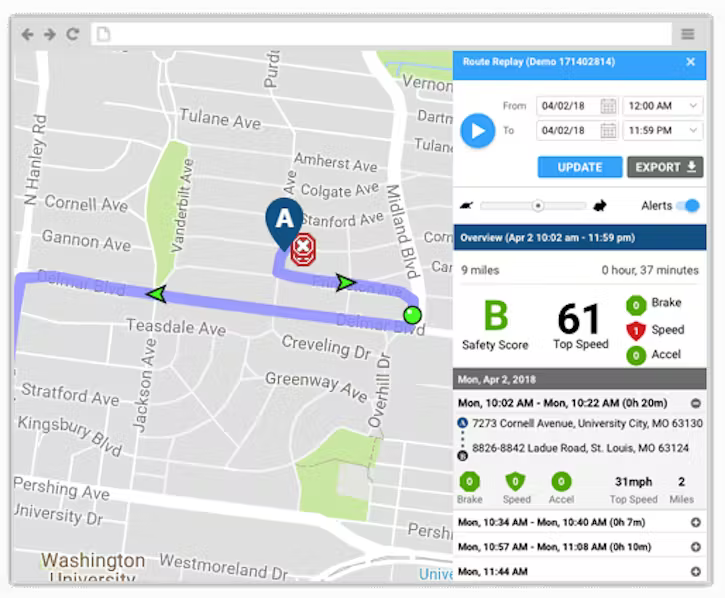
Using Linxup’s intuitive Google Maps interface, you can review detailed driving history. You can:
- Review each driver’s daily driving history with animated, interactive route replay.
- Break each day down into detailed trip segments.
- Review stops, alerts, and other key driving events.
- View street-level details to gain deeper insight.
Simplify Driver-to-Vehicle Assignments with Linxup’s Driver ID
Linxup's Driver ID solution simplifies the process of identifying the driver by effortlessly recording the current driver-to-vehicle assignment. The Bluetooth 5.0 fob, which lasts for 5 years, stays with the driver and automatically assigns the driver based on proximity to the vehicle tracker each time the ignition is turned on.
- Know who is driving at all times, helping to prevent unauthorized use, enhance safety, and foster accountability.
- Say goodbye to dash drilling, noisy fob readers, and app dependence.
- Get an accurate hands-off driver assignment that is wireless and painless.
The Driver Safety Report Card
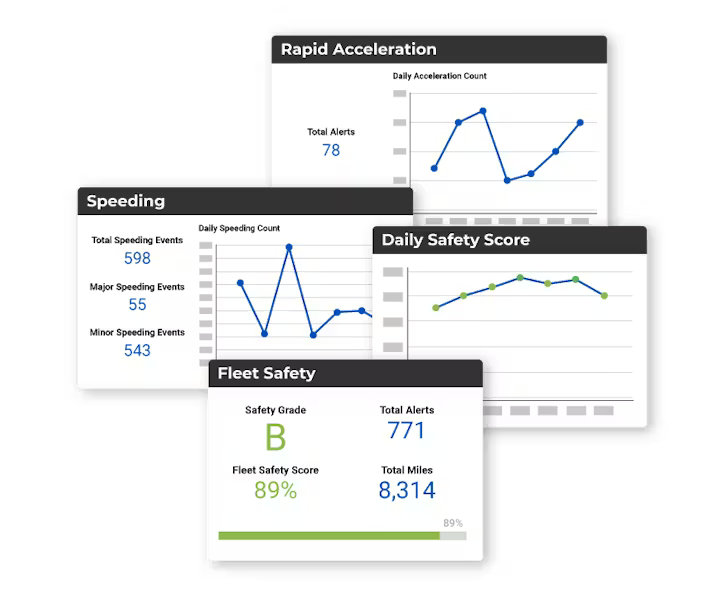
The Linxup system monitors unsafe driving activity such as speeding, harsh braking, and rapid acceleration. Using this data, we generate a daily driver safety report card that provides:
- A daily performance score and grade for each driver
- A summary of key safe driving behaviors and alerts
- A summary of key data such as stops, miles driven, and idling activity
Ensure Drivers Only Use Vehicles When Authorized
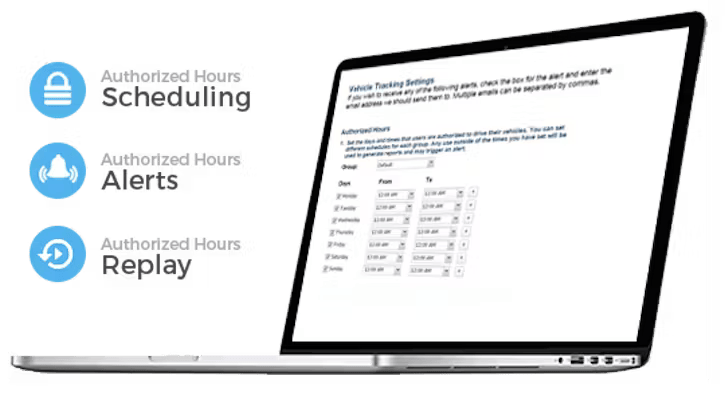
Linxup’s system gives you the ability to establish the times or days of the week when your drivers are allowed to use your vehicles. Reduce wear and tear and expensive fuel usage by:
- Setting a schedule of authorized hours.
- Receiving real-time alerts when vehicles are in use outside your schedule.
- Replay the driving details for unauthorized use.
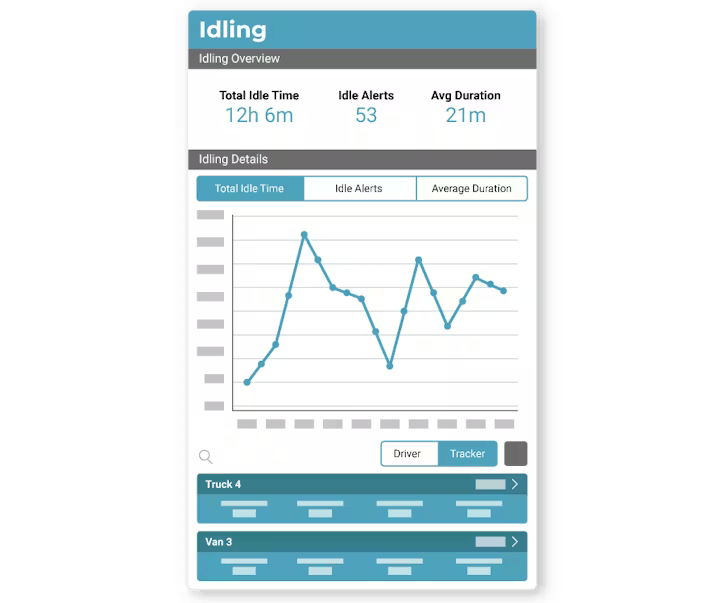
Reduce Vehicle Idling and Save on Fuel Costs
Fuel expense is one of the most costly aspects of fleet management. By monitoring when and how much your vehicles are idling, Linxup can help you reduce fuel usage by as much as 20%. An instant savings. You can:
- Set a maximum amount of time a vehicle can idle before you are alerted.
- Generate detailed reports showing which vehicles and drivers idle the most.
- Use the data to coach your drivers and reduce fuel usage.